Digital Notebooks: Using Technology to Support Learning in a Virtual World
Digital Notebooks: Using Technology to Support Learning in a Virtual World
This past school year has been a monumental year for trying - and sometimes failing - to find ways to make learning work in a virtual world. As an intern, I’ve explored many different educational strategies both through classroom coverages and in my grad school classes. One tool that I’ve had great success with is Google Notebooks, or digital notebooks. I learned about it at SHU, tested it out in a first grade class, and discovered how beneficial Google Notebooks can be in supporting learning for both in-person and online learners. Digital, interactive notebooks have also been shown to "boost their engagement" (Edutopia). Read on to learn more about Google Notebooks, and explore some helpful tips for making them work in your classroom!

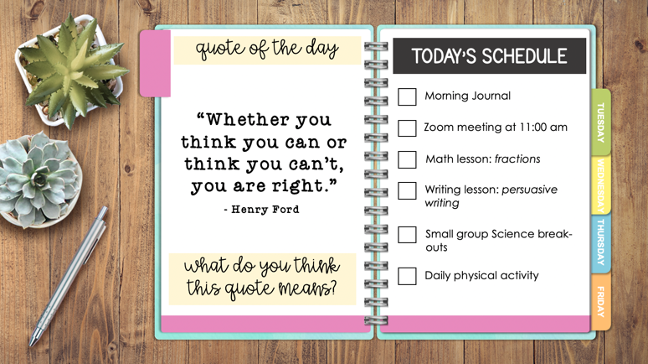
Google Notebooks are interactive, digital “notebooks” compiled in a Google Slides presentation. You can fill it with academic content, photos, videos, and links - anything you want your students to explore and engage with. You may also choose to create a notebook where your class can respond to questions, take notes, and demonstrate their learning directly in the digital presentation. By creating a digital notebook, the possibilities of what you may include, and how it can support your teaching, are endless. The Notebook is saved on Google Drive, so it can be accessed from anywhere. This means your students can access it whether they are in the classroom, at home, at daycare, at grandma’s house, or wherever they may be doing their learning. You also have the opportunity to differentiate certain slides to meet the individual needs of your students. I found that recording audio over the pages of the Google Notebook helped young first graders navigate the assignment. This is a great tool for teachers with ELL and students with IEPs who may require additional support
Benefits of using Digital Notebooks:
Students can interact with the slides using multimedia content.
The teacher can add additional slides, updating what is available to students as the lesson, unit, or project goes on.
Students can add to and reference their work from any device.
Students can create examples of their learning that can be shared easily with classmates and families.
Students can add comments and tag the teacher to ask questions and/or request support.
Free Google Notebook Templates
There are tons of free templates available to use in your own classroom. All of these are editable and customizable, so you may fill it with whatever you and your students need to bring the lesson to life.
Slides Go
This site has a great selection of notebooks that can be used for all sorts of things. There are notebooks for lessons, teacher binders, choice boards and more!
Teachers Pay Teachers
This site has a huge collection of Google Slides templates, made for teachers by teachers. Make sure to filter by price; there are great FREE options if you are teaching on a budget.
Shelley Gray Teaching
This site has a great collection of bright and colorful themed Google Notebook templates. These aesthetic options will appeal to students and encourage active exploration of the notebook!
https://shelleygrayteaching.com/digital-notebook-templates/
Additional Resources:
Tutorial for Creating your Notebook:
Tips and Tricks for Editing your Notebook:
I chose to share the benefits of digital notebooks in this blog post because its something that I have tried, with success. The feedback I received was very positive; the first graders enjoyed exploring the Mentor Text read aloud books I linked in a Google Notebook designed to support writing, and the option to record your voice and translate it to text helped many of the students get their thoughts and ideas onto a planning paper clearly. I look forward to designing more Google Notebooks for my own classroom this coming fall, and I hope you give it a try too!
References:
“Energize Your Classroom With Motivating Interactive Digital Notebooks.” Two Boys and a Dad, 8 Apr. 2021, www.twoboysandadad.com/2016/06/interactive-digital-notebooks-google-slides.html.
“Google Slides Interactive Notebooks + 20 Activities to Fill Them.” Ditch That Textbook, 29 Mar. 2021, ditchthattextbook.com/google-slides-interactive-notebooks-20-activities-to-fill-them/.
Tucker, Catlin. “Creating Digital Notebooks with Google Slides.” Dr Catlin Tucker, catlintucker.com/2019/08/creating-digital-notebooks-with-google-slides/.


Hi Shawna,
ReplyDeleteI recently made a digital notebook in one of my SHU technology classes. I also found great success with this when I used it in the classroom. I created one for SEL learning and was able to use it this fall with distance learning. My favorite part was how interactive it could be. Students were able to edit, comment, and design when appropriate. It also made sharing links, documents, and other resources easy and accessible. I look forward to using more next year when I have a class of my own for the full year. They can be used for so many different parts of the school day with a variety of features and purposes. Thanks for sharing the free templates, I always used Google Slides but those look easy to start with and fill in for the appropriate need. It's also great that they can be accessed from anywhere. I need to explore more on the sharing, privacy, and accessibly for parents piece of it. Thanks for sharing! -Amanda Orvis
Hi Shawna,
ReplyDeleteI appreciate you sharing so many useful resources, particularly the Google Notebook templates. Your post has me sold on digital notebooks! I also took ED-642 last semester, but I did not create a digital notebook for my project. However, after seeing and hearing about the success some of my classmates had with using digital notebooks with their students, I can definitely see myself using them in the future. Digital notebooks may be one of the most beneficial digital learning tools to use during fully remote instruction, as they are engaging for students, easy to use, and very organized.
-Colleen Konkol
Hi Shawna!
ReplyDeleteI had never used or seen digital notebooks before this year so this is a brand new resource for me! This year I saw it used in classrooms mostly for science and social studies. I would not have any idea how to create something like this for my own classroom so I really appreciate the tips and how to video. Although I am partial to having a physical notebook in the classroom I do think this is a great alternative for the accommodations teachers have had to make to get through this unusual year of learning. They are convenient and easy to use so I do think they'll stay around post covid. There are so many ways to use them, the possibilities are endless. It;s a great tool for all teachers no matter what grades or subjects you teach. good job, thank you!
-Grace
Hi Shawna! Digital notebooks are new for me as well! I struggled with digital notebooks last year because I used Google Docs. I had all of the students sharing the same notebook and it became very confusing after a week! This seems like a very organized way to have a digital notebook for each student. I also think that it will be much more motivating than just a Google doc because with Google slides you can add pictures, different backgrounds, and even add Pear Deck to make the slides interactive for classmates to share too! I am definitely going to try this!
ReplyDeleteHi Shawna,
ReplyDeleteI also created Google Notebooks for that class and had success with them. My Google notebooks delivered literacy support lessons to struggling students in second and fourth grade. Like you, I found that the ability to put audio into the slides was extremely helpful, especially for my second graders. I recorded myself reading directions and pronouncing sounds. This was very important for lessons where the same combination of letters can have different sounds, such as "ed" sounding like /d/, /t/, and /ed/ at the end of different words. It also allowed me to help the students more. Instead of spending time repeating directions, the students could access my directions by themselves whenever they needed. Students were able to work more independently at their own pace, and I was able to devote my time to giving instructional support. I believe Google Notebooks are a great tool for students learning from home and in the classroom. I will keep using them! Thank you for sharing so many fun templates!
Best,
Kate
Hi Shawna! I recently learned about Google notebooks myself, and now I've definitely found out more helpful tips and resources to explore more! The sharing ability and easily accessible templates that exist are super helfpful and a time saver as well, which is a small but huge help to a teachers busy planning day when all they need to do is input their information, and is a relief to not have to worry about creating its display too. Especially during this time of the pandemic, this type of resource is so relevant and useful - thanks for sharing!
ReplyDeleteHi Shawna! I chose to do a digital google notebook for my class last semester with my Kindergarten class. I found such success in it too!! Thank you thank you thank you for adding those free notebook templates because I searched everywhere and for so long to find good ones. I think Google notebooks are awesome because they can be individualized for each student and there are so many varieties and ways to use them. Its really helpful that you added tutorial videos because there so many different ways to used Google Slides as a digital notebook. I thought using them with younger kids might be difficult, but after doing more research and learning how to use them effectively, it turned out to make a huge impact on their learning. Thank you for sharing this. It's a great resource that I'll definitely look back to. Great job!
ReplyDeleteHi Shawna- Great job on your blog post! I think you did a great job synthesizing what Google Notebooks are! I have seen them on TPT, but I never knew how widely you can use them. I really enjoyed utilizing your resources and watching the videos explaining how to create user-friendly notebooks. I think that this is a great way to organize your information and it can help organize the day (something we can all use!). I think this is great and I am going to try to use these for our class next year!
ReplyDeleteHi Shawna!! Great resources here. I actually just created a digital notebook type resource for my independent research project in EdTech. I love that digital notebooks can be really customized for specific students needs and creates a place just for them to work on. I had made my own through Google Slides, but I have never seen them on TPT. Definitely a resource I want to check in the future. I definitely want to research more fun and creative layouts and templates for them too!! Great resources & content here!
ReplyDeleteI love this idea! I have played around with the idea of interactive notebooks but never put enough time and energy into it to really make it a success. I can't wait to explore your videos more and really put the strategies to work. This will probably be one of my summer projects. I liked how you included your experience and how you learned about these digital notebooks, made one, and found success...in a first grade classroom no less! I think if first graders can do this than any other grade can, too! I like how there are different template options to keep students interested as well. I look forward to implementing an interactive notebook in my classroom soon.
ReplyDelete